
Custom Redirects
A redirect sends respondents to any URL you choose — automatically, right after they submit your form. Common examples include a Calendly booking page, a payment or checkout page, or your own branded thank-you page on your website.
How redirects work
Section titled “How redirects work”When a respondent reaches the end of your form and submits, Formware shows your Thank You Page first. After the delay you configure (the Redirect Wait Time), the respondent’s browser is automatically redirected to your URL.
This means the flow looks like this:
Submit → Thank You Page displays → wait time elapses → automatic redirect
Set up a redirect
Section titled “Set up a redirect”- Open your form in the form editor and click the Thank You Page section.
- In the settings panel on the right, enable the Redirect toggle.
- Enter your redirect URL — for example,
https://calendly.com/your-linkor your own landing page. - Set the Redirect Wait Time in seconds.
- Preview the form, submit a test response, and verify the redirect works.
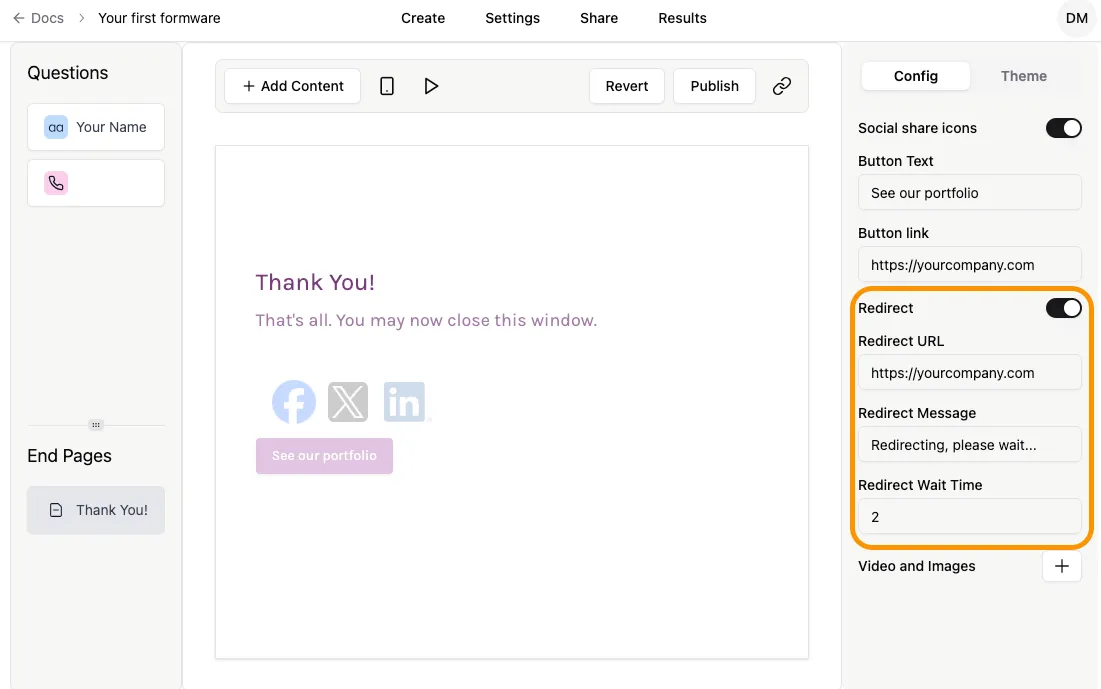
Redirect Wait Time
Section titled “Redirect Wait Time”The Redirect Wait Time controls how long respondents see your Thank You Page before being redirected, in seconds.
This is useful when you want respondents to briefly see a confirmation message — “Thanks, we’ve received your submission” — before being taken to the next step, such as your booking calendar. For example, a wait time of 3 seconds gives respondents just enough time to register the message without interrupting the flow.
If you’d rather move respondents along immediately, simply set a shorter wait time.
Using the button and redirect together
Section titled “Using the button and redirect together”Your Thank You Page can include both a button and a redirect at the same time. Respondents see the Thank You Page — including its title, description, and button — during the wait time, and after the delay they are automatically redirected to your URL.
For example, you could keep a button that links to your website while the redirect sends respondents to your booking page after a few seconds.
Popular redirect setups
Section titled “Popular redirect setups”- Booking page (Calendly, Cal.com, etc.) — a respondent finishes your lead form and lands directly on your calendar to book a call. This is a common pattern in lead generation funnels.
- Payment or checkout page — send respondents straight to checkout after an order or registration form.
- Your own branded thank-you page — keep respondents on your domain instead of a hosted end screen. You can bake static tracking parameters into the URL (for example,
?utm_source=formware) using the UTM builder. Note that parameters are the same for every respondent — you cannot insert per-respondent data into the URL. - Next step of a funnel — chain a form into a longer journey. Combined with partial submissions (which capture leads who abandon early), redirects let you control what happens for leads who complete the form.
Formware vs. Typeform vs. Fillout redirects
Section titled “Formware vs. Typeform vs. Fillout redirects”If you’ve searched for “Typeform automatic redirect” or “Fillout automatic redirect”, here’s the key difference: in Typeform and Fillout, redirects fire immediately when the form is completed — you can’t show your thank-you message for a few seconds first. Formware’s Redirect Wait Time gives you that window, so respondents see your confirmation before being forwarded.
| Capability | Formware | Typeform | Fillout |
|---|---|---|---|
| Redirect after submission | ✅ (Pro) | ✅ | ✅ |
| Configurable wait time before redirect | ✅ | ❌ (immediate) | ❌ (immediate) |
| Show a thank-you message before redirecting | ✅ | ❌ | ❌ |
Want the full picture? See the complete Formware vs. Typeform and Formware vs. Fillout comparisons. And if you’re switching: Formware’s Free plan includes unlimited forms, questions, and responses — redirects unlock on Pro.
Good to know
Section titled “Good to know”- The redirect URL is static. Every respondent is sent to the same URL — you can’t route respondents to different URLs based on their answers, and you can’t dynamically insert answers or hidden field values into the URL.
- Need the respondent’s data in your own systems? Even though the redirect URL is static, the full submission still reaches your tools — use hidden fields for attribution data and webhooks to push submissions into your CRM or automation stack.
Is the redirect available on the Free plan? No. Redirects are a Formware Pro feature. On Free, you can customize the Thank You Page title and description.
Can I redirect to different URLs based on answers? No. A form has a single static redirect URL. Conditional logic can control which questions respondents see, but the post-submission redirect is the same for everyone.
Can I pass form data into the redirect URL? No. The redirect URL is static and identical for all respondents. To get respondent data into your systems, use hidden fields and webhooks.
What happens if I configure both the button and the redirect? Both work together: respondents see your Thank You Page (with its button) during the wait time, then the automatic redirect fires.
Do redirect URLs need HTTPS? Yes. Non-HTTPS URLs will not redirect.
How long can the wait time be? The wait time is configured in seconds — 3 seconds is a typical choice. Set a shorter wait time if you want the redirect to feel near-instant.
Related articles
Section titled “Related articles”- Thank You Page
- Partial submissions
- Hidden fields
- Custom domains
- Webhooks
- Formware vs. Typeform
- Formware vs. Fillout
Implementation notes:
- Two screenshots needed —
enable-redirect.pngat minimum (settings panel with toggle + wait time). Consider a second showing the URL field. - On-publish edit to the thank-you page: compress its “Redirect to URL” section into ~2 sentences + link here (per the anti-cannibalization plan). Keep its HTTPS caution.
- Competitor claims — the wait-time table reflects what you confirmed. Both tools do ship redirects today, so I kept their ✅ and narrowed the ❌s to the wait-time/message-first behavior. Worth a quick re-verify before publishing since competitor docs change.
- I deliberately avoided claiming a min/max wait-time range and what happens on button-click mid-wait — add those if/when confirmed.
- Don’t forget the sitemap entry and inbound links from
/use-case/lead-generation/and/help/integrations/webhooks/.