
And / Or Conditions
A single condition is often enough — if the answer is “No”, jump to the end. But real-world logic frequently depends on combinations: “budget is high and the timeline is urgent”, or “the answer is A or B”. Every rule in Formware can hold multiple conditions, joined with and / or.
Adding conditions to a rule
Section titled “Adding conditions to a rule”In a question’s Logic settings, add conditions to a rule one by one. Each condition has:
- a source — this question, a previous question, a variable, or a hidden field
- an operator — matching the type of data it compares (see Condition Types & Operators)
- a value to compare against
Between conditions, choose and or or — and you can mix the two within the same rule.
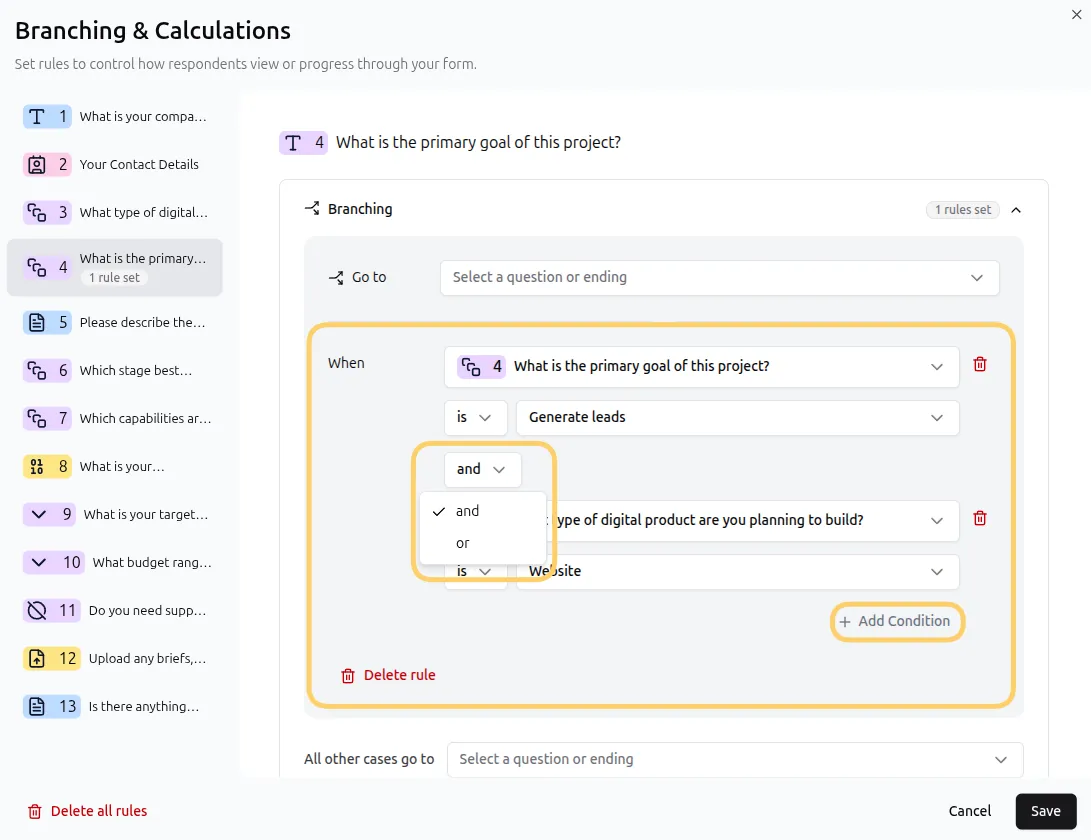
How and/or evaluates: left to right, no precedence
Section titled “How and/or evaluates: left to right, no precedence”Conditions are evaluated left to right, with no operator precedence. Each condition joins the combined result of everything before it:
A and B or C → evaluated as (A and B) or C
Worked example — a lead qualification rule with three conditions:
- Budget is greater than 5000 and
- Timeline is “Immediately” or
- Company size is greater than 50
evaluates as:
(Budget > 5000 and Timeline = “Immediately”) or Company size > 50
→ “Big urgent deals, or big companies.”
Condition order changes the meaning
Section titled “Condition order changes the meaning”Because there’s no precedence, reordering the same conditions produces different logic:
- Company size is greater than 50 or
- Budget is greater than 5000 and
- Timeline is “Immediately”
now evaluates as:
(Company size > 50 or Budget > 5000) and Timeline = “Immediately”
→ “Urgent big companies or urgent big budgets.”
Same three conditions — different rule. Always read your conditions left to right to check they group the way you intend.
Prefer several simple rules over one complex rule
Section titled “Prefer several simple rules over one complex rule”There’s a second dimension to combining logic: a question can hold multiple rules, each with its own conditions and its own action. That’s usually the cleaner tool:
- Conditions within a rule = one group, one shared action
- Multiple rules = independent groups, each with its own action, running in order
Instead of one long condition chain, split the logic:
Rule 1: Budget > 5000 and Timeline = “Immediately” → set
segmentto “priority”Rule 2: Company size > 50 → set
segmentto “enterprise”
Each rule is readable on its own, and each can take a different action. Remember that rules run top to bottom and a matching branching jump stops the rest — see Rule order matters in the Conditional Logic guide.
Can I use parentheses to group conditions? No — conditions group strictly left to right. When you need explicit grouping, split the logic into multiple rules: each rule is its own group.
Does the order of conditions matter? Yes. With left-to-right evaluation, A or B and C means (A or B) and C — reordering changes which conditions combine first. Read the rule left to right to verify the grouping.
How many conditions can one rule have? As many as the logic needs — each new condition joins the previous with and/or.
Should I use one rule with many conditions, or many rules? One rule when all the conditions share a single outcome; multiple rules when different combinations should trigger different actions. Multiple rules also keep complex forms easier to debug.