
What is an Organization
A Formware organization allows you to collaborate with multiple team members across shared workspaces. When you’re invited to a shared workspace by a Formware Pro user, you automatically join their organization.
Organizations let teams:
- Centralize management of users and workspaces
- Control access and permissions across multiple projects
- Share forms, submissions, and analytics securely
- Maintain visibility on member activity across the organization
How to Switch Organizations
Section titled “How to Switch Organizations”When you log in to Formware, your account opens to your Workspaces and organization. Organizations may include both personal and shared workspaces.
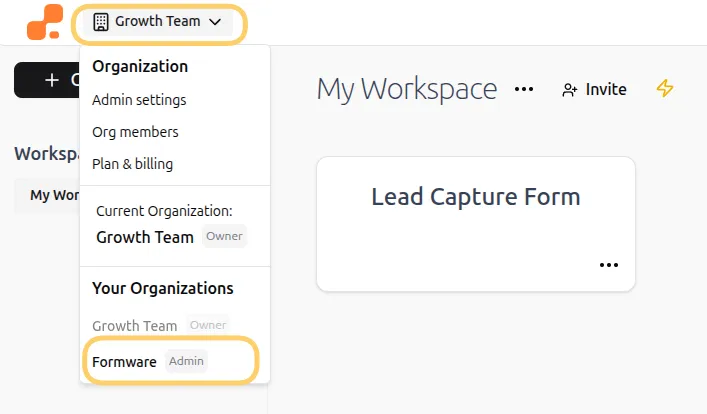
- Click the account alias in the top-left corner of your workspace.
- A menu will open showing your account options.
- Under Your organizations, you’ll see all organizations you’ve been invited to or own.
- Click the organization you want to view. Your workspace list will update to show only workspaces associated with that organization.
Who Owns an Organization?
Section titled “Who Owns an Organization?”The creator of the Formware account is always the organization owner. Ownership cannot be transferred. Owners can:
- Invite new members
- Manage organization roles and workspaces
- Control billing and settings
Other members cannot change ownership.
How to Remove Someone from Your Organization
Section titled “How to Remove Someone from Your Organization”Only Organization Owners and Admins can remove members from an organization.
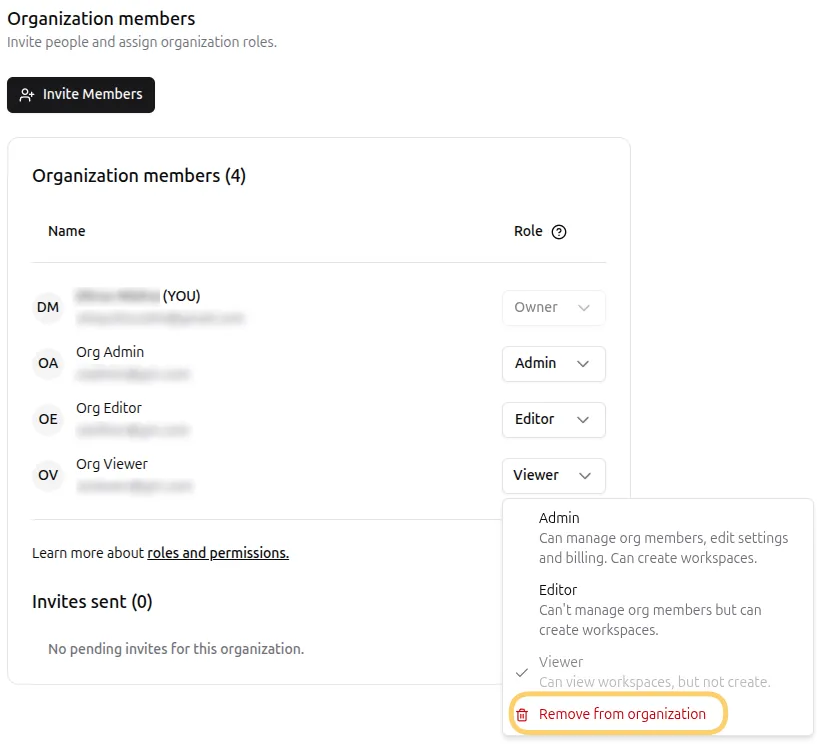
- Go to Org Members in the organization menu.
- Locate the member you want to remove.
- Click the dropdown arrow next to their name and select Remove from organization.
- Confirm the removal in the warning popup.
Removing a member:
- Revokes access to all organization workspaces
- Transfers any unshared workspaces they created to your account
- Maintains any integrations the member had set up
How to Leave an Organization
Section titled “How to Leave an Organization”Currently, members cannot leave an organization on their own. Only an Owner or Admin can remove you. Members can only see workspaces they are invited to.
Organization Member Limits
Section titled “Organization Member Limits”Formware allows unlimited members in each organization, making it easy to scale teams without restrictions.